
Microsoft 365 Premium
More power from Microsoft 365.
Fully installed for you.
Enjoy familiar Microsoft apps, personal cloud storage for up to six people, and enhanced Copilot AI features for the subscription owner. PC Help 50+ helps with installation.
INSTALLATION HELP INCLUDED
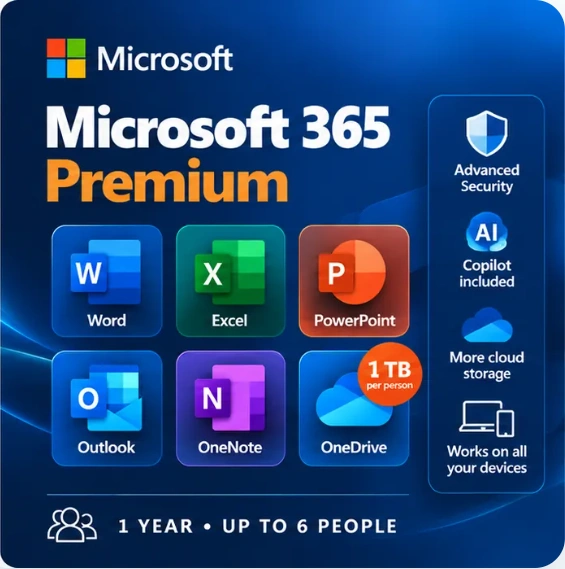
Everyday essentials
Your familiar Microsoft apps
Create documents, manage email, organise files and get more done with supported AI assistance.
Write letters, documents and reports.
Manage budgets, tables and calculations.
Build presentations and slideshows.
Keep email, calendars and contacts together.
Organise notes, plans and ideas.
Access files and photos across devices.
What’s included
Everything in Microsoft 365 Premium
A one-year subscription, with enhanced AI features for the subscription owner and shareable Microsoft 365 benefits for up to six people.
Word, Excel, PowerPoint, Outlook and OneNote on compatible devices.
The subscription owner can share eligible Microsoft 365 benefits with five others.
Up to 6 TB total when six people use the plan, with separate personal storage.
Each person can be signed in on up to five compatible devices simultaneously.
The subscription owner receives enhanced AI usage allowances, subject to Microsoft limits.
More AI assistance for supported apps and tasks; availability may vary.
Additional security tools for supported personal devices.
Eligible Microsoft 365 apps stay current.
Each invited person keeps their own documents and storage.
PC Help 50+ helps you install and activate the software.
Copilot and AI
What can Premium AI help you do?
Use Copilot to help draft and refine writing, explore ideas, summarise information and work with supported Microsoft apps. Premium provides enhanced access for people who use AI more often.
Important: The enhanced Premium AI benefits belong primarily to the subscription owner. People you share the plan with do not automatically receive those same Premium AI entitlements.
Examples of AI assistance
✓ Draft or improve a letter or email.
✓ Summarise supported documents.
✓ Brainstorm plans and presentation ideas.
✓ Explore information in supported applications.
Features, usage limits, language support and availability depend on Microsoft’s current terms and supported apps.
PC Help 50+ makes it simple
How installation assistance works
Order online
Buy Microsoft 365 Premium securely through our checkout.
We help you install
Get assistance with installation, activation and initial setup.
Start using Microsoft 365
Use your apps and cloud storage, and explore supported Copilot features.
Complex data migrations, multiple-device setups or extensive training may require a separate arrangement.
Choose your plan
Is Premium the right choice?
Personal — €49.50: ideal for one person.
Family — €64.50: ideal for up to six people who need apps and private storage.
Premium — €99: for households that also want enhanced Copilot access for the subscription owner.
Common questions
Microsoft 365 Premium FAQ
How many people can use Premium?
The subscription can be shared with up to five other people, making six in total for eligible shared benefits.
Does everyone receive enhanced Premium AI?
No. Enhanced Premium Copilot benefits are primarily for the subscription owner. Shared members receive eligible Microsoft 365 benefits, but not automatically the same AI entitlements.
What is the difference between Family and Premium?
Both support up to six people and up to 1 TB of OneDrive storage per person. Premium adds enhanced Copilot access and additional AI capabilities for the subscription owner.
How much cloud storage is included?
Each eligible person receives 1 TB of OneDrive storage, up to 6 TB in total across six accounts.
Will it work on my computer?
Microsoft 365 supports compatible Windows PCs, Macs and supported mobile devices. Contact us if you’re unsure about your device.
Is installation included in €99?
Yes, installation and initial setup assistance are included. Extensive migrations or other additional services may need a separate arrangement.
What happens after one year?
Renewal is needed to continue full subscription benefits. If the plan expires, Office apps may have reduced functionality and OneDrive storage allowances may change.
Do I need an internet connection?
Internet is needed for setup, activation, updates, OneDrive syncing and online AI services. Many installed desktop features can be used offline.
Ready to get started?
Microsoft 365 Premium, made simple.
One year of Microsoft 365 Premium, enhanced AI benefits for the subscription owner and installation assistance from PC Help 50+.
INSTALLATION HELP INCLUDED
Up to 6 people · Up to 1 TB per person · Premium AI for subscription owner
For official product information, visit Microsoft’s official Microsoft 365 website .